Practice management for acupuncturists and small clinics

Keep your acupuncture practice organized and your day running smoothly.

Scheduling, forms, visit notes, checkout, superbills, and follow-up—all connected in one clear workflow for independent acupuncturists and small clinics.

Write naturally first. Add structure when needed.

Explore the acupuncture workflow with fictional data. See how Practiq fits acupuncture.

  • Free Solo plan
  • No credit card required
  • Does not automatically expire
Practiq Front Desk showing a fictional practice setup checklist and what needs attention
Actual Practiq Front Desk · Fictional demo data Explore the interactive demo

One connected visit

Know what is ready, what is missing, and what needs attention next.

Practiq keeps the visit moving in one clear sequence, so notes and administrative work are less likely to be left behind.

  1. 1 Appointment
  2. 2 Forms
  3. 3 Visit Note
  4. 4 Checkout
  5. 5 Follow-up

A real practice day

See the work move, not just a list of features.

These screens come from Practiq’s fictional acupuncture demo and show three connected points in the same daily workflow.

Step 1

See what needs attention today.

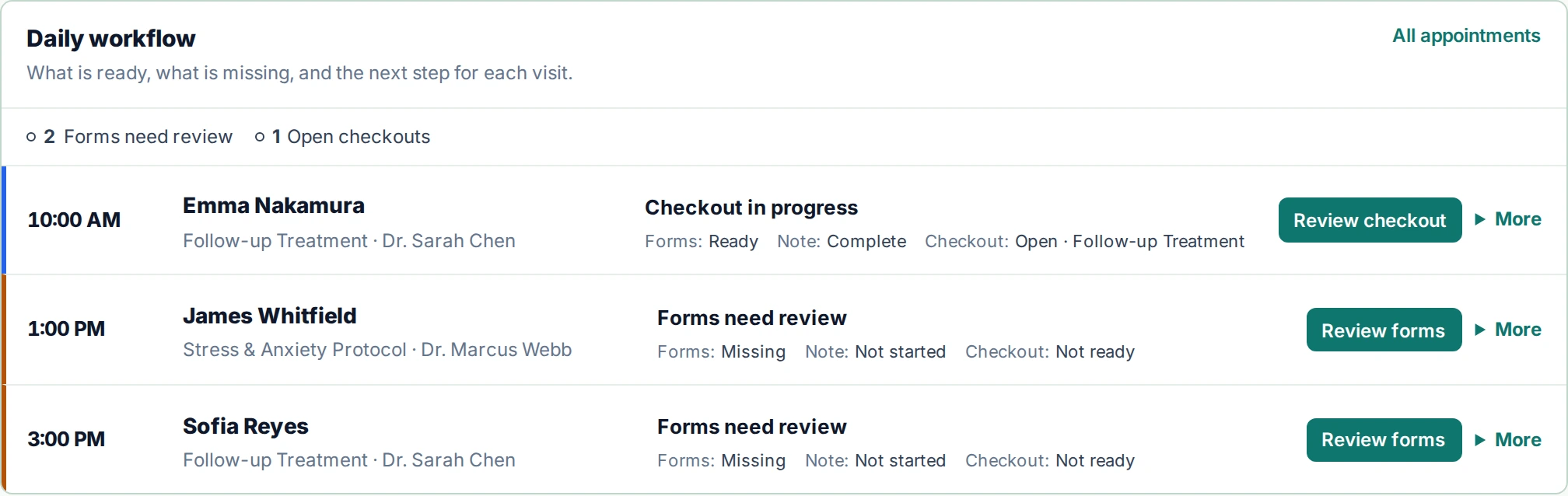
Front Desk keeps appointments, setup gaps, forms, notes, and checkout readiness in view.

Practiq Front Desk showing a fictional acupuncture practice setup checklist and daily readiness
Front Desk · Fictional demo data

Step 2

Write the visit note naturally.

Start with the clinical story in your own words. Use a simple note or add structure when the record needs it.

Practiq simple visit note with fictional acupuncture follow-up details
Natural visit note · Fictional demo data

Step 3

Finish checkout without losing the next step.

Review payment, documentation, and the linked visit together, then keep follow-up visible.

Practiq completed checkout showing fictional payment and linked visit status
Checkout review · Fictional demo data
Explore the full workflow in the interactive demo

Built close to the work

Built by a former practitioner and software developer.

Alfred created Practiq after seeing how notes, forms, follow-up, checkout, and administrative work compete with patient care. He is personally available to help early practices configure a practical starting workflow.

Change at your pace

You do not need to move everything at once.

Start with one workflow, confirm that it fits, and expand from there. Add patients manually or use the supported CSV import. Solo stays free without an automatic expiration.

Data control

Keep a way back out.

Authorized practice owners and administrators can export supported practice data. Access remains limited by practice and role.

Practiq Implementation

Need hands-on help?

Starting at $295

Practiq includes free self-service setup and free guidance and troubleshooting for every plan. For practices that want Practiq to perform setup, customization, training, or migration work, optional Practiq Implementation services start at $295.

What it can include

  • Practice setup, services, availability, forms, and workflow configuration.
  • CSV import assistance, data cleanup, or migration planning after a short scope review.
  • Training or onboarding support before and after launch.

The final scope and price are confirmed before work begins. Complex migration, data cleanup, extensive customization, and additional work are estimated separately.

Practiq Implementation is optional and available under the same terms to Solo, Plus, and Clinic customers. Purchasing implementation services is never required to use Practiq.

Guidance and troubleshooting are free. Done-for-you setup, customization, training, and migration are paid services.

Manual scope review and manual invoicing are used. Do not include patient names, records, medical details, or other PHI in the request.

Front desk, practitioners, owners

Each person needs a different starting point.

Small practices lose time when everyone has to ask where things stand. Practiq keeps the next step visible.

Know what needs attention

Front Desk

  • Today's appointments
  • Arrivals
  • Missing forms
  • Ready for checkout

Start with the right patients

Practitioner Today

  • Today's patients
  • Patient history
  • Unfinished notes
  • Drafts to finish

Keep setup clear

Owner/Admin Settings

  • Practice profile
  • Fees and superbills
  • Staff access
  • Practice settings

Notes that fit real practice

Use structure when you need it.

Keep notes flexible when the visit does not fit a rigid box.

Use acupuncture, PT-style, trauma release/bodywork, or custom templates when they fit the care.

Checkout and superbills

Checkout should not become another hunt.

After the visit, Practiq keeps payment, balances, and superbill support with the visit.

Staff can see what is open and what is ready to close.

Help Center and staff onboarding

When staff get stuck, they can search.

New staff need a place to start. The Help Center explains the basics in plain language.

Search Front Desk, forms, checkout, superbills, Practitioner Today, and common questions instead of guessing.

Practiq is web-based: staff use a browser login, with no app upload or installation required.

Small practice types

For your kind of practice

An acupuncture day is not the same as a massage day. A chiropractic visit is not the same as a wellness session. Start with the page closest to your work.

Scope

A few clear boundaries

Practiq is for the daily work of a small practice. It is not a hospital system, an AI clinician, or an insurance claims tool.

Not hospital software
Not an AI clinician
Not automatic booking chaos
Not insurance claim filing

Pricing

Clear pricing. No surprises.

Start with free Solo, then move to Plus or Clinic when your practice is ready.

Solo

$0/month

Forever free for one practitioner, with patient records, scheduling, visit notes, and core follow-up.

  • 1 practitioner
  • Patient records
  • Basic scheduling
  • Visit notes
  • Basic follow-up
  • AI drafting (Plus)
  • Advanced follow-up (Plus)
  • Multiple practitioners (Plus / Clinic)
  • Unlimited practitioners (Clinic)
Start free with Solo

Plus

$99/month

For growing small clinics with up to 5 practitioners. Adds optional AI drafting and advanced follow-up tools.

  • Up to 5 practitioners
  • Patient records
  • Scheduling
  • Visit notes
  • Optional AI drafting
  • Advanced follow-up
  • Appointment requests
  • Unlimited practitioners (Clinic)
Start free first

Clinic

$199/month

For larger practices with unlimited practitioners and expanded operational support.

  • Unlimited practitioners
  • Patient records
  • Scheduling
  • Visit notes
  • Optional AI drafting
  • Advanced follow-up
  • Appointment requests
  • Expanded operational support
Start free first

Herb & Product Inventory — $19/month add-on

Add inventory tracking only if products are part of your practice.

Stripe handles Practiq subscription billing.

FAQ

Straight answers.

Yes. Write in natural language for routine visits, or switch to SOAP mode when the record needs more structure. You choose per visit.

Yes. Staff and practitioners use Practiq through a browser login. There is no app upload or installation required.

Practiq is best for independent practitioners and small clinics where the same day can include arrivals, missing forms, unfinished notes, checkout, and follow-up.

Yes. Many teams write brief, natural notes and add structure only when needed.

Yes. If you write the facts in rough form, Practiq can help turn that into clearer draft text. You review and edit before saving.

Yes. Patients request a time and your clinic confirms it.

No. AI suggestions are optional drafts only. Nothing is sent or saved automatically, and practitioners stay in control.

Practiq helps with checkout, superbills, and documentation for reimbursement. It does not currently submit insurance claims or act as a clearinghouse.

Start with Solo.

Forever free for one practitioner, with patient records, scheduling, visit notes, and core follow-up.